Changing your Fallback URL
Last updated: May 7, 2026
The Fallback URL setting lets you choose where visitors land when they follow a broken or outdated link to one of your Mutiny assets. Instead of seeing an error page, they'll be redirected to a URL you control.
When your account is created, this setting defaults to your company domain
What is a 404 page?
A 404 page is the error page visitors see when a link no longer works. This happens when an asset has been deleted, unpublished, or its URL has changed. Setting a Fallback URL ensures visitors always land somewhere useful instead of hitting a dead end.
Setting your Fallback URL
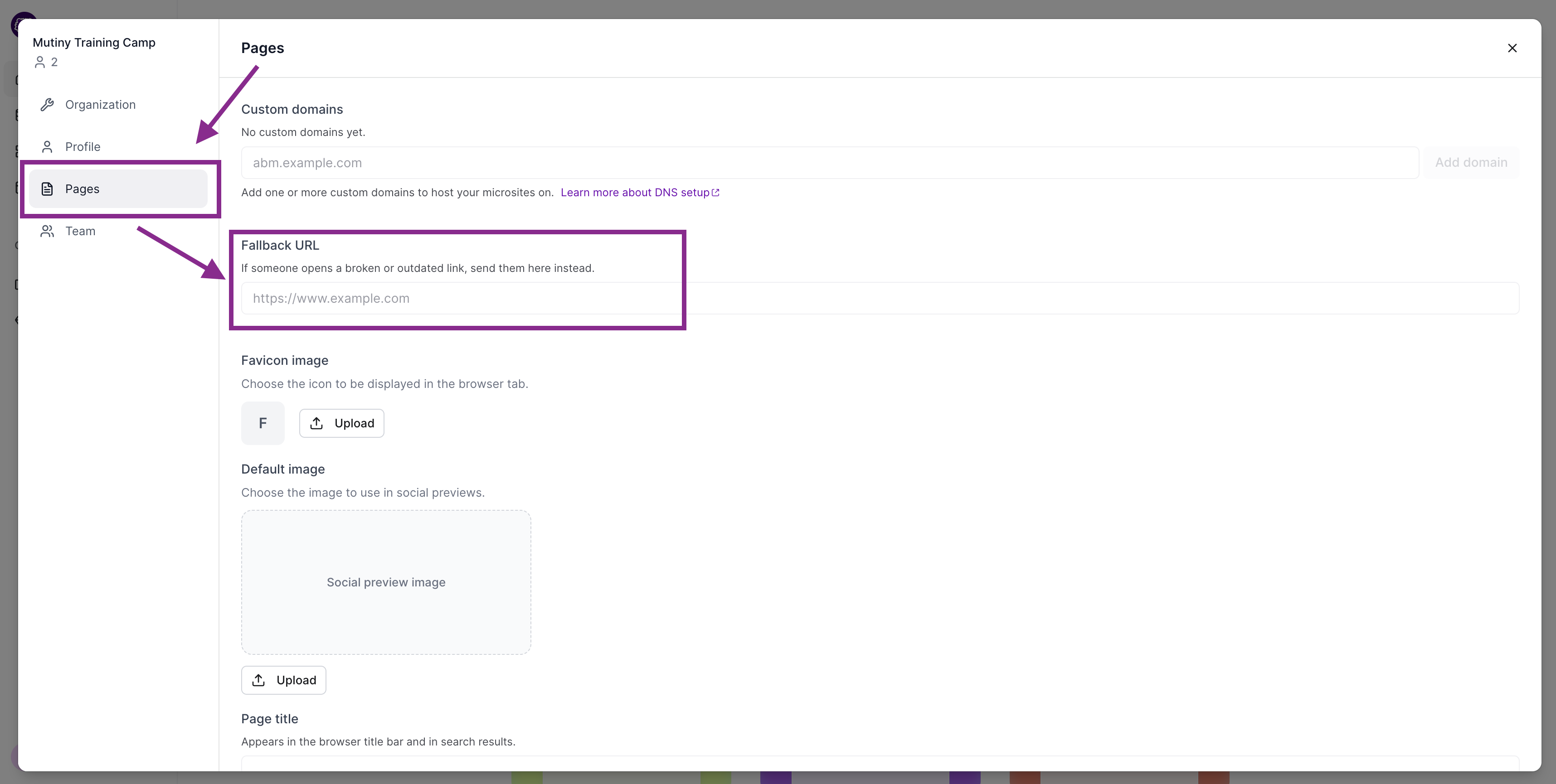
Open the user menu in the bottom left corner and select Settings, then navigate to Pages. You'll see a Fallback URL section. Enter the URL you want broken or outdated links to redirect to.
Need Help?
If you have questions or need help, the Mutiny Support team is here for you! You can submit a support ticket using the Submit a ticket button at the top of this page, or reach us at support@mutinyhq.com.