AI Research and Data Enrichment in Account Studio
Last updated: April 6, 2026
This is an enterprise-only feature. Interested in upgrading to an enterprise plan? Email the team at mutinylovesyou@mutinyhq.com to get plan upgrade information.
AI Research in Account Studio allows you to enrich your account data with insights generated by artificial intelligence. This powerful feature helps you add valuable data points that can be used for filtering, personalization, and asset targeting.
1 credit covers 50 enrichments (one enrichment = one cell in one row). Credits are pooled across the team, so if two people each run enrichments that together hit 50, one credit gets deducted automatically. 📄 Managing Your Team & Billing in Mutiny
What is AI Research?
AI Research uses artificial intelligence to analyze publicly available information about your accounts and generate custom data points based on your specific questions. This allows you to:
Add data points that don't exist in your CRM or other integrations
Answer specific questions about your accounts at scale
Create custom fields for filtering and personalization
Generate insights for time-sensitive information
Adding AI Research to Your List
Step-by-Step Process
Select Your List: Start with an existing list or create a new one in Account Studio
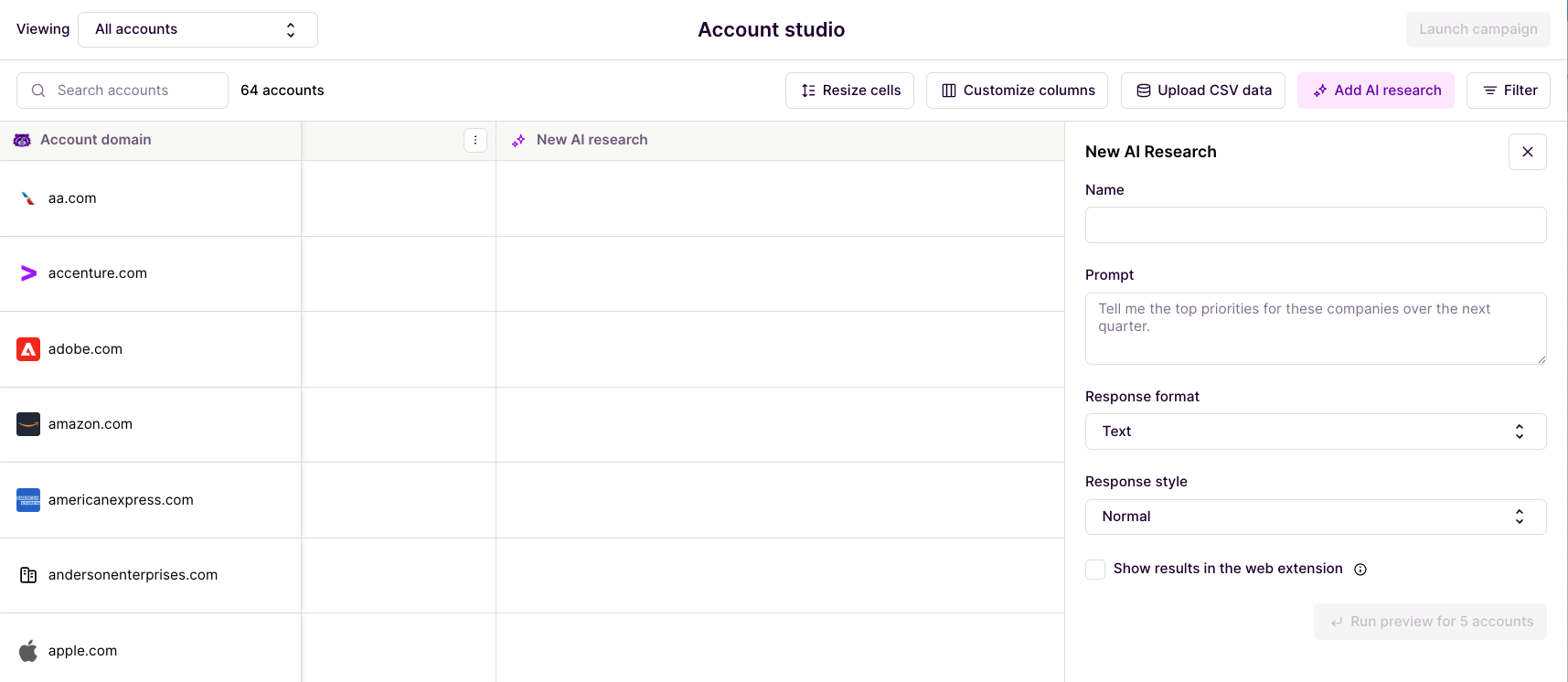
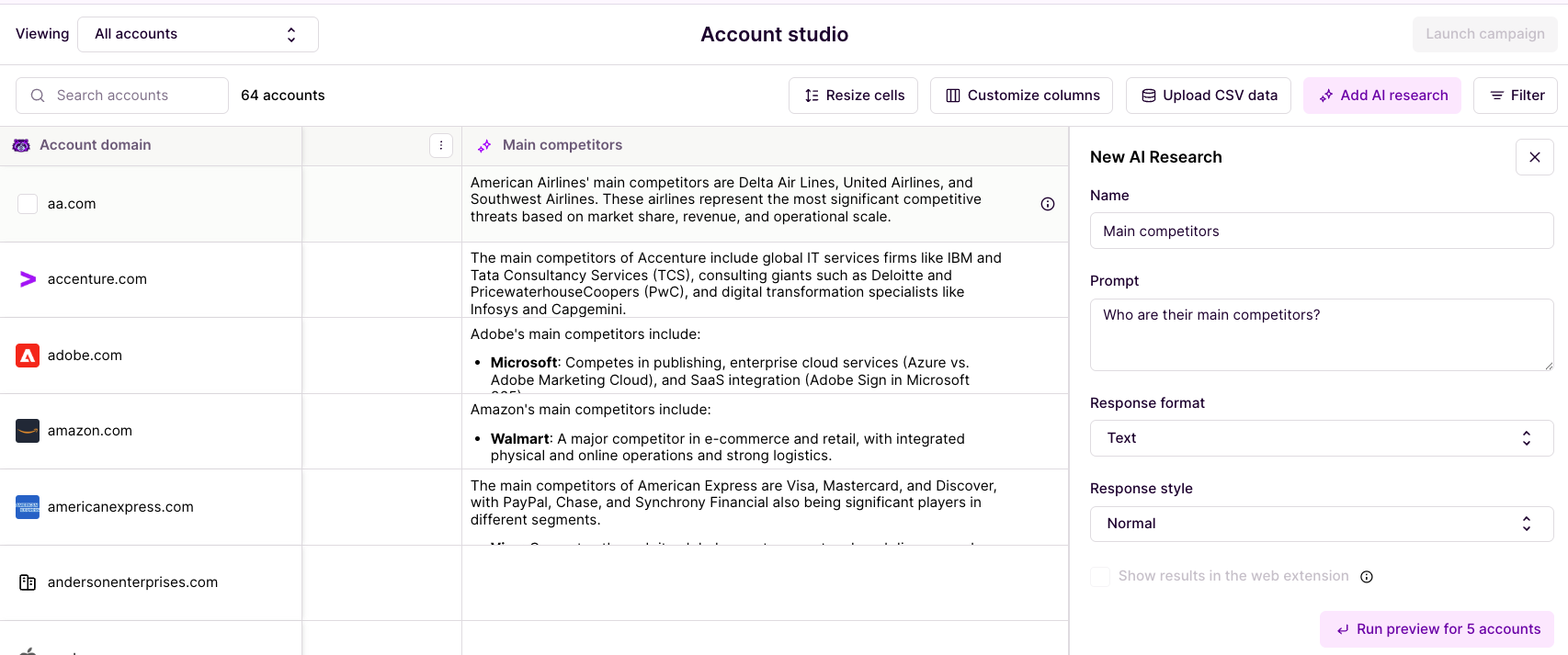
Add AI Research Column: Click "Add AI Research"
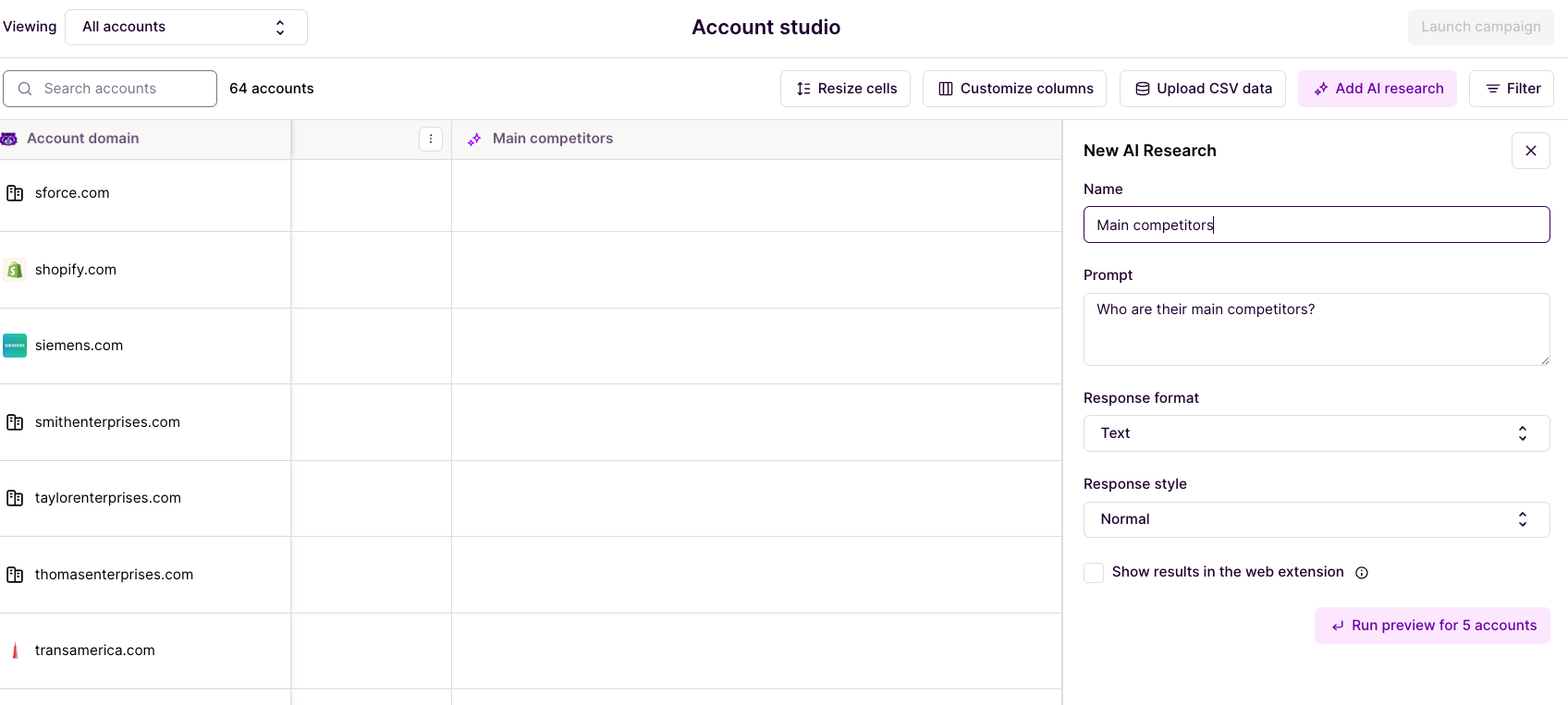
Configure Your Prompt: Write a clear, specific prompt for the data you want
Preview Results: Review the first 5 accounts to ensure quality
Run for All Accounts: Execute the research across your entire list
Writing Effective Prompts
The quality of your AI research results depends heavily on how you write your prompts.
Be Specific and Measurable
Good: "Have they raised funding in the last 6 months?"
Poor: "Are they growing?"
Use True/False Questions When Possible
Good: "Do they have a remote work policy?"
Poor: "What's their work environment like?"
Include Timeframes When Relevant
Good: "Have they launched new products in 2025?"
Poor: "Do they launch new products?"
Ask for Specific Information
Good: "What industry vertical do they primarily serve?"
Poor: "Tell me about their business"
Example Prompts:
Funding and Growth
"Have they raised funding in the last 6 months?"
"Are they in a growth stage or mature stage?"
"What was their most recent funding round size?"
Technology and Tools
"Do they use Salesforce as their CRM?"
"Are they primarily a SaaS company?"
"What marketing automation platform do they use?"
Market and Competition
"Who are their main competitors?"
"What market segment do they serve (SMB, Mid-Market, Enterprise)?"
"Are they B2B or B2C focused?"
Understanding AI Research Results
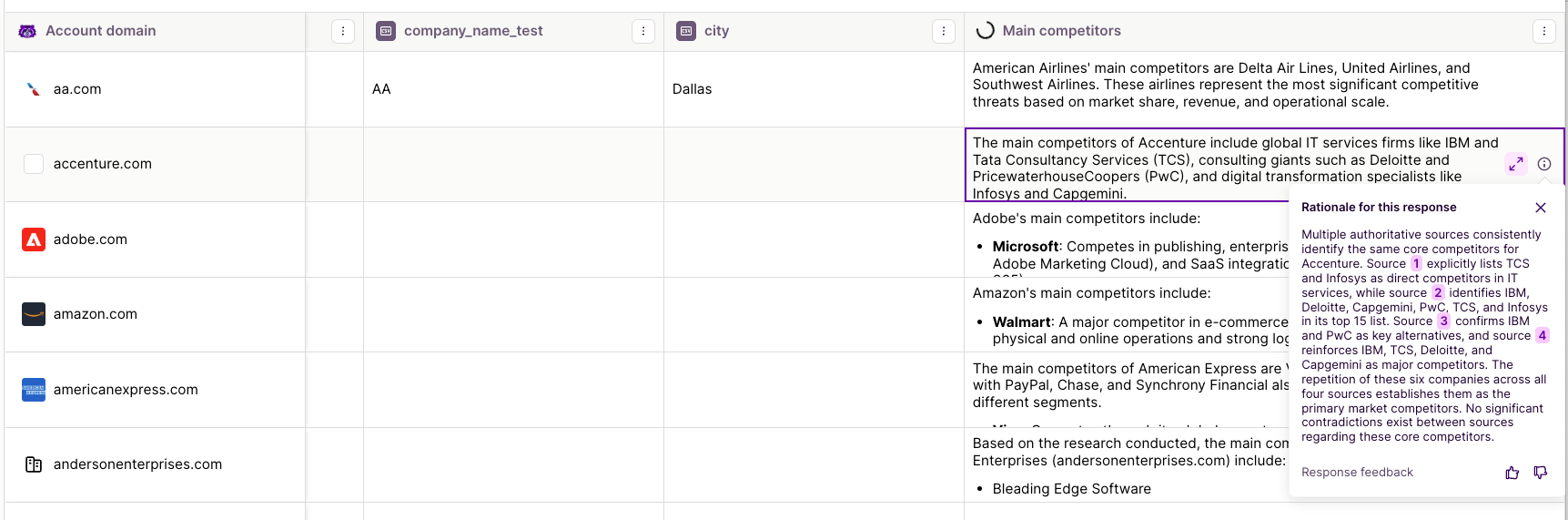
Each AI research result includes:
The Answer: The generated data point
Rationale: Explanation of why this answer was chosen
Sources: References used to generate the answer (when available)
Interpreting Results
High-Quality Results: Clear answers with specific rationale and sources Medium-Quality Results: Answers with general reasoning but limited sources Low-Quality Results: Vague answers or "unknown" responses
Note: AI research quality depends on the availability of public information about each account.
Managing AI Research
Handling Incomplete Results
If some accounts don't have AI research data, you have several options:
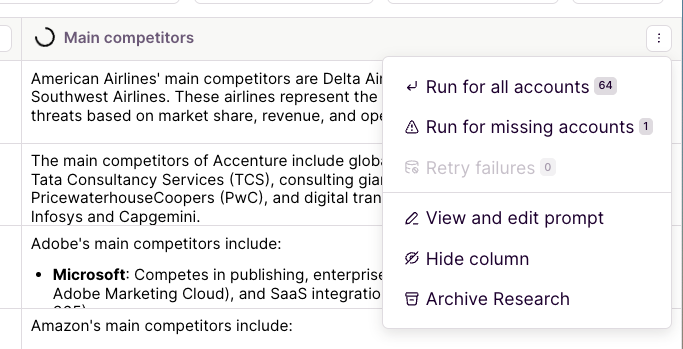
Run for Missing Accounts
When to Use: When you've added new accounts to your list
How: Click "Run for Missing Accounts" in the AI research column
Result: Only empty cells will be processed
Retry Failures
When to Use: When some accounts failed to process
How: Click "Retry Failures" option
Result: Failed attempts will be re-processed
Updating AI Research
Edit Prompts
Modify Research Question: Change your prompt to get different insights
Refine Criteria: Make prompts more specific or broader as needed
Add Context: Include additional context for better results
Rerun Research
Update Existing Data: Run updated prompts across all accounts
Refresh Time-Sensitive Data: Manually update time-based research
Improve Quality: Rerun with better prompts for higher quality results
Time-Sensitive Research
Some AI research is time-sensitive (e.g., "raised funding in the last 6 months"). Currently, you need to manually rerun this research to keep it current.
Best Practices for Time-Sensitive Research:
Note the date you ran the research in your prompt or list name
Set calendar reminders to refresh time-sensitive data
Consider the refresh frequency based on your use case
AI Research Performance
Processing Speed
AI research processes accounts in batches and may take time for large lists. Current performance factors:
Batch Processing: Accounts are processed in groups
Rate Limits: Processing speed may be limited during high usage
Model Upgrades: Performance improvements are ongoing
Preview Mode
Always use preview mode before running AI research on large lists:
Preview First 5: See sample results before full execution
Quality Check: Ensure prompts are working as expected
Refine Prompts: Make adjustments based on preview results
Using AI Research for your Assets
Filtering with AI Research
Once you've added AI research to your list, you can use it for filtering:
True/False Fields: Filter for "Yes" or "No" responses
Text Fields: Filter by specific text values
Exists/Does Not Exist: Filter accounts that have research data
Personalization with AI Research
AI research data can be used in asset personalization:
Dynamic Content: Reference AI research fields in your assets
Targeted Messaging: Use insights to customize your messaging
Audience Segmentation: Create segments based on AI research results
Advanced AI Research Strategies
Layered Research
Build comprehensive account profiles by adding multiple AI research columns:
Basic Information: Industry, size, business model
Technology Stack: Tools and platforms they use
Market Position: Competitors, market segment
Recent Activity: Funding, product launches, hiring
Research for Filtering vs. Personalization
For Filtering: Use true/false or categorical questions
"Are they in a growth stage?" (Yes/No)
"What market segment do they serve?" (SMB/Mid-Market/Enterprise)
For Personalization: Use more detailed, narrative responses
"What are their main business challenges?"
"What makes them different from competitors?"
Quality Optimization
Improve Research Quality:
Use specific, focused prompts
Include relevant context in your questions
Test prompts with preview mode
Refine based on results
Monitor Research Performance:
Review rationale and sources for accuracy
Check for consistent "unknown" responses
Adjust prompts based on result quality
Troubleshooting AI Research
Common Issues
Incomplete Results
Some accounts may not have enough public information
Try broader or more general prompts
Use "Run for Missing Accounts" to fill gaps
Inconsistent Results
Review prompt specificity
Check if timeframes are too narrow
Consider the availability of public information
Getting Better Results
Prompt Optimization:
Start with broad questions and narrow down
Use industry-specific terminology when relevant
Include examples in your prompts when helpful
Data Quality:
Focus on publicly available information
Avoid questions requiring internal company knowledge
Use multiple research columns for comprehensive insights
Best Practices Summary
Before Running AI Research:
Test with Preview: Always preview results first
Refine Prompts: Make sure questions are clear and specific
Consider Timeframes: Include relevant time periods
Plan for Updates: Consider how often you'll need to refresh data
During AI Research:
Monitor Progress: Check processing status
Review Quality: Look at rationale and sources
Handle Failures: Use retry options for failed accounts
After AI Research:
Validate Results: Spot-check accuracy where possible
Use for Filtering: Apply research data to refine your lists
Plan Maintenance: Schedule updates for time-sensitive data
Document Process: Keep notes on effective prompts
For more information on using your enriched lists for assets, see our asset personalization documentation
Need Help?
If you have questions or need help, the Mutiny Support team is here for you! You can submit a support ticket using the Submit a ticket button at the top of this page, or reach us at support@mutinyhq.com.