Create Sections from a Screenshot
Last updated: June 24, 2026
The Mutiny Agent can build entire sections from scratch using just a screenshot as a reference. Simply upload an image of the design you want to recreate, and the agent will generate the section for you.
Prepare your screenshot
Take a screenshot of the section you want to recreate from any website. The image can come from any source, a competitor's site, a design mockup, or a live page you'd like to replicate.
Send your prompt
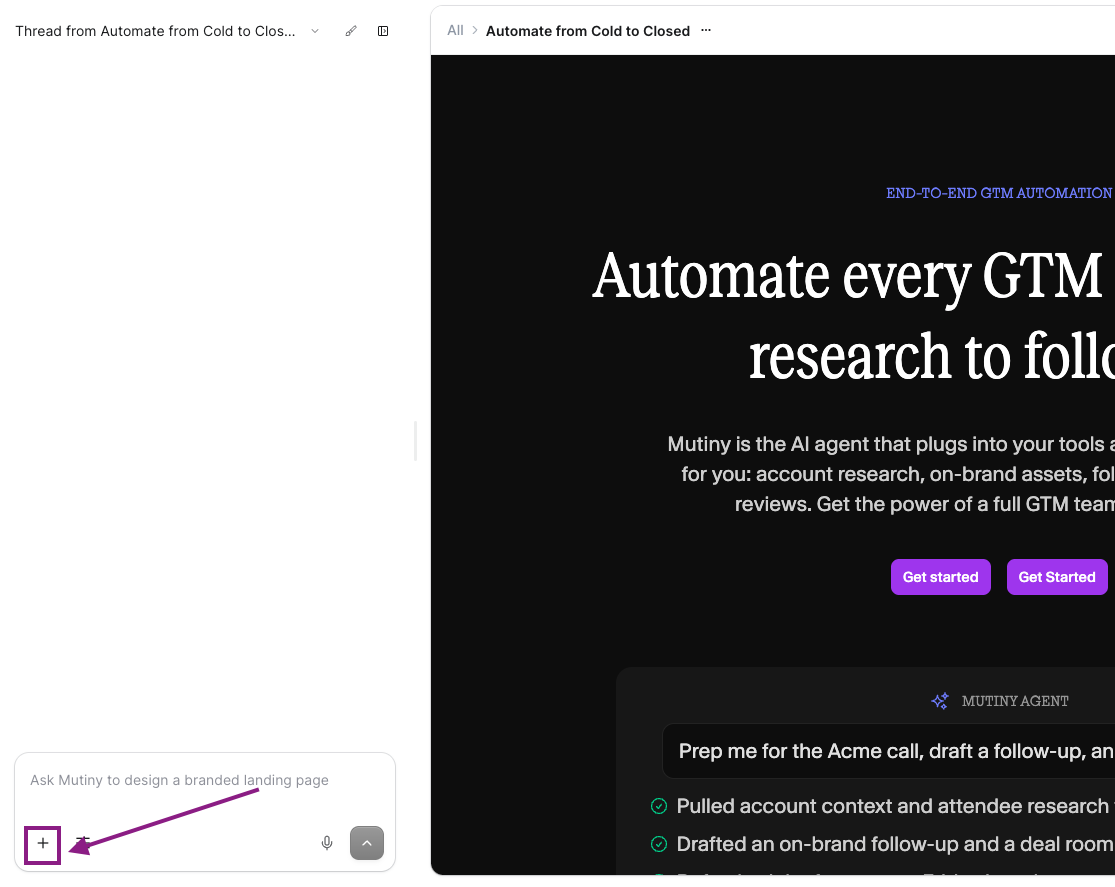
Open the chat and describe where you want the new section placed, such as "below the hero." Attach your screenshot and ask the agent to match it, for example: "Create a section below the hero that matches the attached screenshot."
Using the + icon in the chatbox to attach your screenshot
Review the output
Once the agent finishes building the section, review the generated section alongside your original screenshot. Check that the key elements are present.
Headers, paragraphs, cards, and any other components from the source design.
Refine content
Work with the agent or use the Design menu to make final adjustments like alignment or spacing. If the agent used placeholder images, upload your own assets to replace them.
Need Help?
If you have questions or need help, the Mutiny Support team is here for you! You can submit a support ticket using the Submit a ticket button at the top of this page, or reach us at support@mutinyhq.com.