Generating Analytics Reports with the Mutiny MCP
Last updated: June 23, 2026
Mutiny's MCP integration lets you ask natural language questions about your account data directly inside your favorite AI tools. Instead of exporting reports or digging through dashboards, you can query your Mutiny data conversationally and turn those insights into action, including triggering asset creation, all without leaving the tool you're already working in.
How to set up the Mutiny MCP:
What you can do with the Mutiny MCP
The MCP gives you access to your Mutiny account data so you can explore analytics, identify trends, and build workflows that connect research to execution.
Some common use cases include pulling weekly account engagement reports, identifying first-time visitors to your assets, spotting accounts that are heavily engaging with a particular asset, and automatically creating new assets based on triggers like someone joining a target account list or RSVPing to an event.
Querying your analytics
Once connected, you can ask your AI tool questions about your Mutiny data in plain language. For example, you might ask:
Which accounts are viewing your assets the most this week and how that has changed since last week?
The tool will pull impression data from your account, including visits tied to known email addresses, and surface a summary of what it finds.
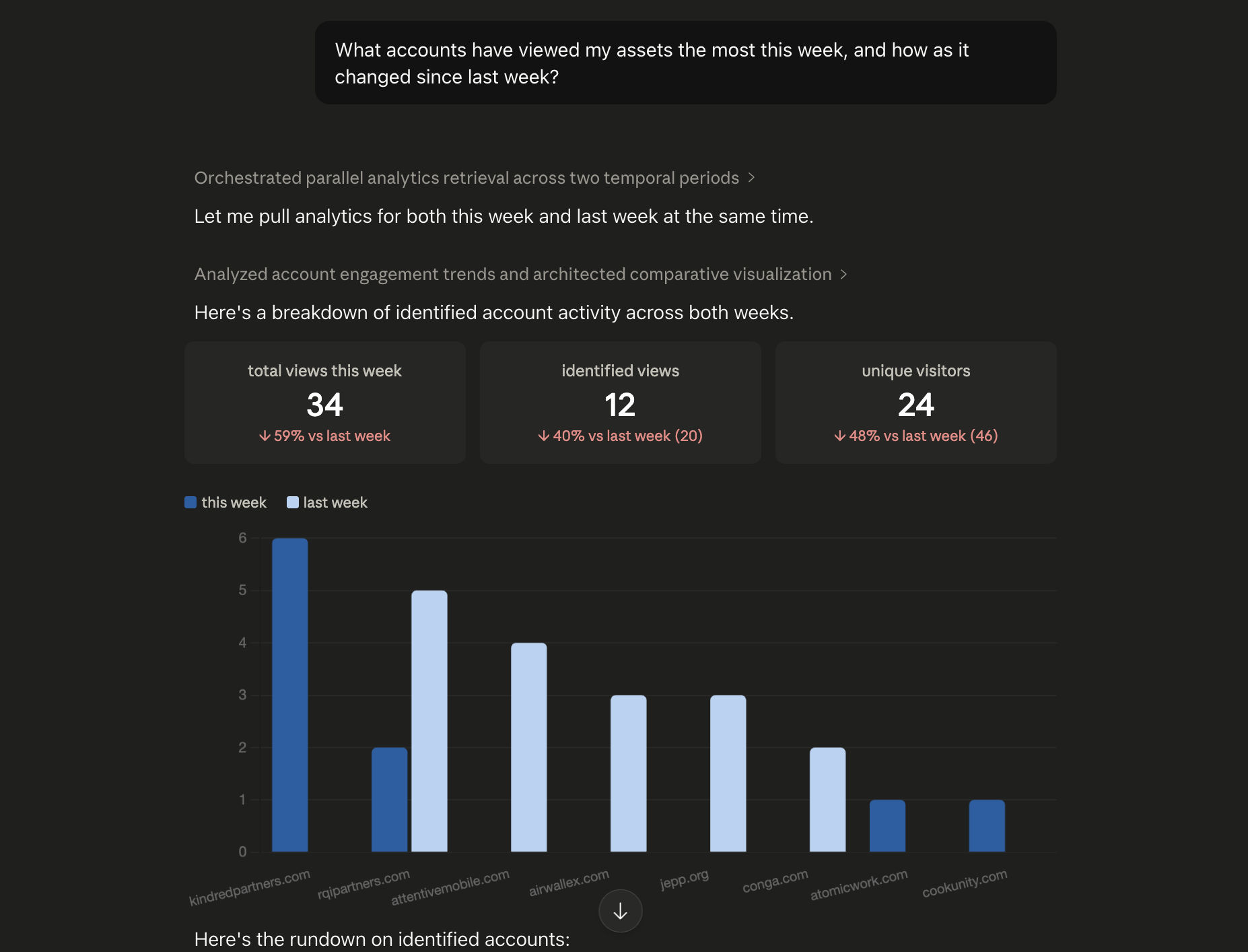
If you want to go deeper, you can give the AI additional context. For instance, if you've named one-to-one assets after specific accounts, you can ask the tool to factor in anonymous visitors by cross-referencing the asset name.
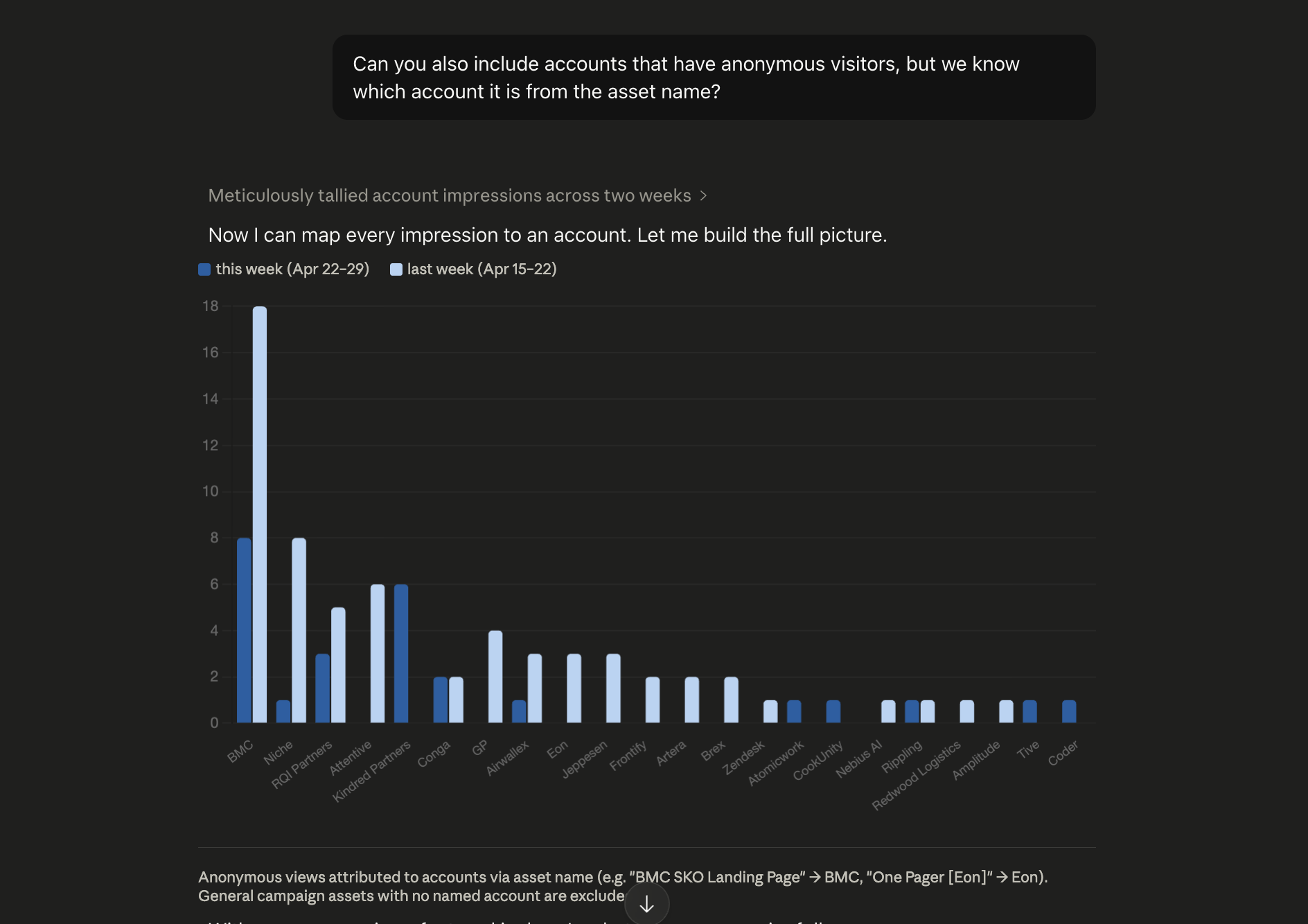
Can you also include accounts that have anonymous visitors, but we know which account it is from the asset name?
This lets you get a more complete picture of account engagement even when visitor identity isn't captured directly.
Turning insights into a live report
After you've refined your query and the results look right, you can ask your AI tool to turn the output into a live artifact, essentially, a refreshable tracker you can revisit week over week. From there, you can continue working with the AI to adjust the format, add or remove data points, and set up a workflow to keep it updated automatically.
Creating Assets from Analytic Insights
Analytics is just the starting point. Once you've identified the right accounts or behaviors, you can use those same insights to trigger asset creation directly from your AI tool.
For example, you might create an intro asset for every account whose first visit was this week, or a follow-up asset for accounts that are engaging heavily with an existing one. More capabilities along these lines are coming to the Mutiny platform, but the MCP gives you a way to start building these workflows today.
What Analytics Fields are Available?
The Mutiny MCP tool call will pull impression data from your account, including visits tied to known email addresses, and surface a summary of what it finds. The data available for each visit includes:
Field | What it tells you |
|---|---|
| When the asset was viewed |
| How long the visitor spent on the asset |
| The visitor's email address, if they've been identified |
| First name, if resolved from your CRM |
| Last name, if resolved from your CRM |
| Job title, if resolved from your CRM |
| How the visitor arrived (e.g. direct, email) |
| URL query parameters at the time of the visit, useful for tracking UTM data |
| An anonymous identifier used to stitch visits together when email isn't available |
Note that account-level data like company domain isn't returned directly in each row, and clicks are only available as an aggregate total, not broken out per visit. Asset names also aren't included, only an internal asset ID, which the MCP resolves automatically when generating your report.
Need Help?
If you have questions or need help, the Mutiny Support team is here for you! You can submit a support ticket using the Submit a ticket button at the top of this page, or reach us at support@mutinyhq.com.